这是一个中文项目,优先用中文写博客。
将在下周完成项目的计划部分。
这也算是开一个坑,先介绍一下项目目标:
1.可以读取储存在文件中的简谱(第一期工程,done)
可以根据响指的声音,对摄像头内容进行抓拍,自动裁切并增强持谱人手里的乐谱进行储存(第三期工程)
2.对乐谱进行基础识别,这里的基础是指正确识别乐谱的数字和高低音(第一期工程)
对乐谱进行完整的识别,这里的完整指包括休止符,滑音,连音,重音的识别(第二期工程)
对乐谱进行更通用的识别,这里的通用指自动忽略汉字等无效信息,可以识别副歌和节拍部分(第三期工程)
3.对乐谱进行播放和表演。鉴于Range同学的平台具有多样性,可以同时使用Linux和Windows平台,Range将选择两种方式进行表演。
方式零:将裁切识别的结果直接展示(第一期,done),组成新的简化的乐谱(第一期,未完成)
方式一:直接在树莓派使用蜂鸣器进行表演,这也是在Linux平台几乎唯一的可选方式,因为Linux平台没有内置容易调用的MIDI相关API,本着尽量使用原生库的原则,Range决定只在Linux保留这种方案。
方式二:在Windows平台直接使用MIDI接口实现。因为照片截取和实现识别在树莓派4B实行,需要通过网络协议将识别结果传送至Windows,因此这也需要相关的网络协议,更需要Range找到合适的乐曲编码方案将数据打包并且传输。
网络协议Range目前有两种实现方式,第一种也是比较成熟的方案,将树莓派安装MQTT的服务端和客户端,Windows使用客户端和树莓派通信。第二种比较原始,也许不应该叫协议,我们使用c标准库的socket进行字节的传输。
方案三:使用串口和Windows通信,Range不是电子相关学生,不采用。
项目实现:
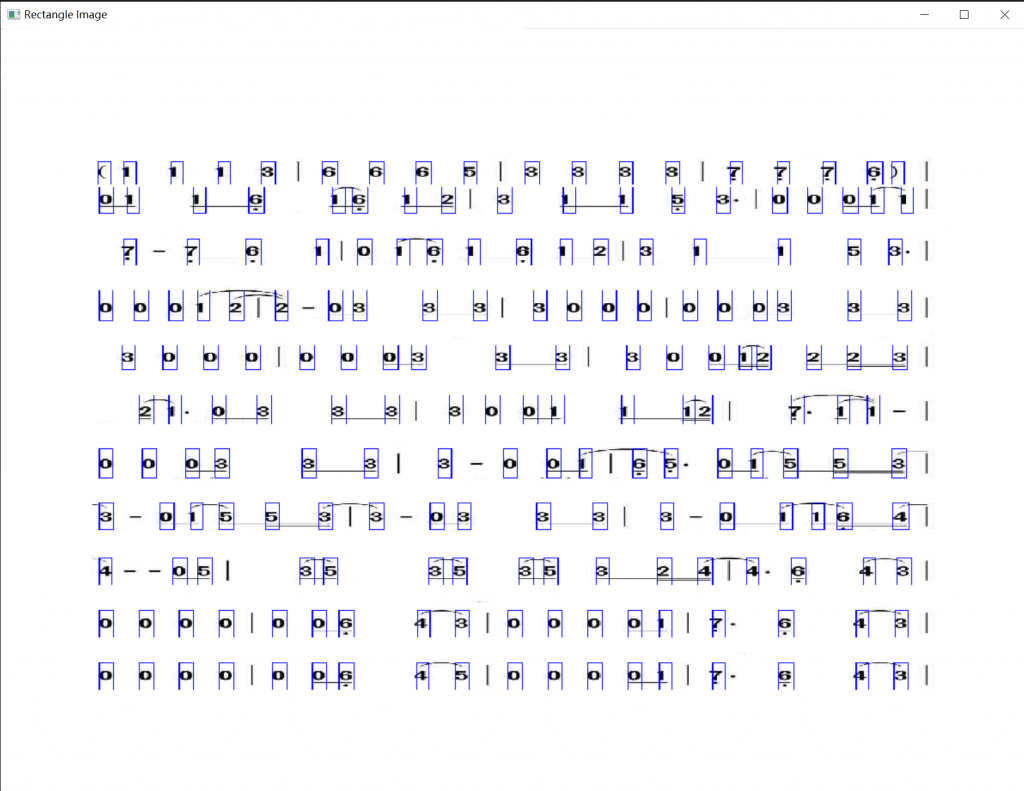
音符的定位和裁切:目前使用二值化加x方向和y方向投影的方式进行定位,很蠢但是很有效
特殊符号的处理:方案也是有很多。方案一是只识别数字,然后根据数字的比例,对相应数字上下的符号进行裁切,如果是比较长的符号,可以尝试一下写一个栈进行匹配
数据的处理和压缩:使用PCA,百用不厌,Linear Algebra立大功!目测降维到10维效果不错,处理也贼快
分类器和匹配:使用KNN和NCC(手写),使用模板匹配(from opencv)
以上方法都挺蠢,如果有时间会尝试CNN的入门,多读读论文没毛病,有512MB超大显存的树莓派不用白不用
性能要求:
在8G_64BIT_OS的树莓派4B上识别时间不得超过3s
我应该学到什么:
1.设计完整产品和系统,对产品的需求和应用有充分认知。
2.对信息(乐谱)的编码和表示,将是我对编码和效率的第一次探索,纵然没有相关知识和经验,至少可以开动脑筋。
3.对图像识别和ocr算法的进一步学习和总结对比。
4.了解网络的传输和对比。
5.更加熟练的远程coding,使用Linux。
6.使用Windows特有的api,感受Windows多媒体开发的魅力,体验Windows和Linux的差异,加强对二者的认知。
7.在如此多的选择中拍定最终方案,并实现它。
8.主动阅读论文,增加论文气氛和实力。
以下是第一期草稿工程的代码,感谢giegie提供的项目和投影判断的方法
import cv2
from skimage.metrics import structural_similarity as ssim
from sklearn.decomposition import PCA
import matplotlib.pyplot as plt
import os
import numpy as np
import imutils

def read_img(img_path):
    """
    This function read img file then strengthen the picture
    args:
     img_path: you should provide file path here
     The return value threshold_img,img_shape,origin img
    """
    img = cv2.imread(img_path)
    gray_img = cv2.cvtColor(img, cv2.COLOR_BGR2GRAY)
    _, threshold_img = cv2.threshold(gray_img, 120, 1, cv2.THRESH_BINARY_INV)
    img_shape=threshold_img.shape
    return threshold_img,img_shape,img

def project_to_y(threshold_img,img_shape):
    """
    This function project picture to y axis
     args:
     threshold_img
     img_shape
     return edge_inf_y,row
    """
    row=0
    img_hight=img_shape[0]
    img_width=img_shape[1]
    threshold_img_arr = np.uint8(np.array(threshold_img))
    #project the image to y-axis
    y_projection=np.sum(threshold_img_arr,axis=1)
    #find the horizontal line(area)
    in_num_flag=0
    edge_temp=0
    edge_inf_y=[]
    for i in range(img_hight):
        if in_num_flag==0 and y_projection[i]>10:
            in_num_flag=1
            edge_temp=i
        elif in_num_flag==1 and y_projection[i]<10 and (i - edge_temp) >50:
            in_num_flag=0
            #if (i - edge_temp) >50:
            edge_inf_y.append([edge_temp,i+1])
            row=row+1
    return edge_inf_y,row

def project_to_x(threshold_img,img_shape,edge_inf_y,row):
    """
    This function project picture to x axis
     args:
      threshold_img
      img_shape
      return the full inf about edges
    """
    img_hight=img_shape[0]
    img_width=img_shape[1]
    x_projection=[]
    #first we need to enhance image again
    kernel = cv2.getStructuringElement(cv2.MORPH_RECT, (3, 3))
    dilate_img = cv2.dilate(threshold_img, kernel)
    #find the number row by row
    edge_inf=[]
    for i in range(row):
        cropImg= dilate_img[edge_inf_y[i][0]:edge_inf_y[i][1], 0:img_width]
        crophight,cropwidth=cropImg.shape
        cropImg_arr=np.uint8(np.array(cropImg))
        #project the image to x-axis
        x_projection=np.sum(cropImg_arr,axis=0)
        #find the vertical line(area)
        in_num_flag=0
        edge_temp=0
        for j in range(img_width):
            if in_num_flag==0 and x_projection[j]>9 and x_projection[j]<50:
                in_num_flag=1
                edge_temp=j
            elif in_num_flag==1 and x_projection[j]<9 and (j - edge_temp) >3:
                in_num_flag=0
                edge_inf.append([edge_inf_y[i][0],edge_inf_y[i][1],edge_temp,j+1])
    return edge_inf

def expo_obj(edge_inf,img,save_path):
    """
    export what we recongnized
    """
    for i in range(len(edge_inf)):
        cropImg= img[edge_inf[i][0]:edge_inf[i][1], edge_inf[i][2]:edge_inf[i][3]]
        cv2.imwrite(str(save_path)+str(i)+".jpg", cropImg)

def ncc(test_char_cmprs,train_char_cmprs):
    """# NCC classifier
    # arg: test_char_cmprs,train_char_cmprs
    # Return value: the name label of the closest number(list)"""
    row_test,_= np.shape(test_char_cmprs)
    row_train,_= np.shape(train_char_cmprs)
    test = float("inf")
    result=[]
    flag=0
    for j in range(row_test):
        test = float("inf")
        for i in range(row_train):
            dist_test = np.sqrt(np.sum(np.square(test_char_cmprs[j,:] - train_char_cmprs[i,:])))
            if dist_test < test:
                test = dist_test
                flag=i
        result.append(flag)
    return result

def gen_pca_field(edge_inf,img,numbers,train_path,x,y,r):
    """
    generate two 2-d arrays(reduced dimension,to r)
    "numbers" is the number of training pictures
    x and y present the size of pictures, only if all pictures are same size we can train the data
    """
    #crop pictures and arrange them into 2-d arrary
    gray_img_whole = cv2.cvtColor(img, cv2.COLOR_BGR2GRAY)
    _, threshold_img = cv2.threshold(gray_img_whole, 120, 255, cv2.THRESH_BINARY_INV)
    test_char=np.zeros((len(edge_inf), x*y))
    for i in range(len(edge_inf)):
        temp_img=threshold_img[edge_inf[i][0]:edge_inf[i][1], edge_inf[i][2]:edge_inf[i][3]]
        char_rcgnz=cv2.resize(temp_img,(x, y))
        img_Vector = np.reshape(char_rcgnz,(1,x*y))
        test_char[i,:]=(img_Vector)
    #then read the train pictures and arrange them into 2-d arrary
    train_char=np.zeros((numbers, x*y))
    for i in range(numbers):
        train_read = cv2.imread(str(train_path)+str(i)+".jpg")
        gray_img = cv2.cvtColor(train_read, cv2.COLOR_BGR2GRAY)
        _, threshold_img = cv2.threshold(gray_img, 120, 255, cv2.THRESH_BINARY_INV)
        char_rcgnz=cv2.resize(threshold_img,(x, y))
        img_Vector = np.reshape(char_rcgnz,(1,x*y))
        train_char[i,:]=(img_Vector)
    #do pca
    pca = PCA(n_components=r)
    pca.fit(train_char)
    test_char_cmprs = pca.transform(test_char)
    train_char_cmprs = pca.transform(train_char)
    return test_char_cmprs,train_char_cmprs


if __name__ == '__main__':
    img_path="D:\\pythonProject4\\jianpu3.jpg"
    #img_path="/home/range/Code/pythonProject4/jianpu3.jpg"
    #img_path="D:\\pythonProject4\\xunlian\\xunlian4.jpg"
    save_path="D:\\pythonProject4\\save\\"
    #read picture
    threshold_img,img_shape,img=read_img(img_path)
    #project to y&x axis
    edge_inf_y,row=project_to_y(threshold_img,img_shape)
    edge_inf=project_to_x(threshold_img,img_shape,edge_inf_y,row)
    #import recognized characters into files
    expo_obj(edge_inf,img,save_path)
    #Do pca
    test_char_cmprs,train_char_cmprs=gen_pca_field(edge_inf,img,len(edge_inf),save_path,61,165,10)
    #result
    result=ncc(test_char_cmprs,train_char_cmprs)
    for i in range(len(result)):
        temp = cv2.imread(str(save_path)+str(result[i])+".jpg")
        cv2.imshow(str(i),temp)
    #show
    rectangle_img=img
    for i in range(len(edge_inf)):
        rectangle_img = cv2.rectangle(rectangle_img, (edge_inf[i][2], edge_inf[i][0]), (edge_inf[i][3], edge_inf[i][1]),(255, 0, 0), thickness=1)
    cv2.namedWindow('Rectangle Image', 0)
    cv2.resizeWindow('Rectangle Image', 600, 500)
    cv2.imshow("Rectangle Image", rectangle_img)
    cv2.waitKey(0)
目前项目存在的致命问题:
1.只能识别那一张图片,参数很死。
2.除了把音符排开,没有任何的展示。
优点:很快,高效(啊对对对)
我想,纵然再没有技术含量,自己去完成一件自己选择的,足够复杂的事情,并且主动做到尽善尽美,也是对自己的磨练。也许别人一周就做出来了,我需要一个月。这也没有关系,这不是我意志完全可控的,也是人外有人,天外有天。希望心中极客之火和科技优化生活的信念永不熄灭。人生不折腾还有啥乐趣,还学啥自己的专业。High on life, bro!
临时计划和方案:
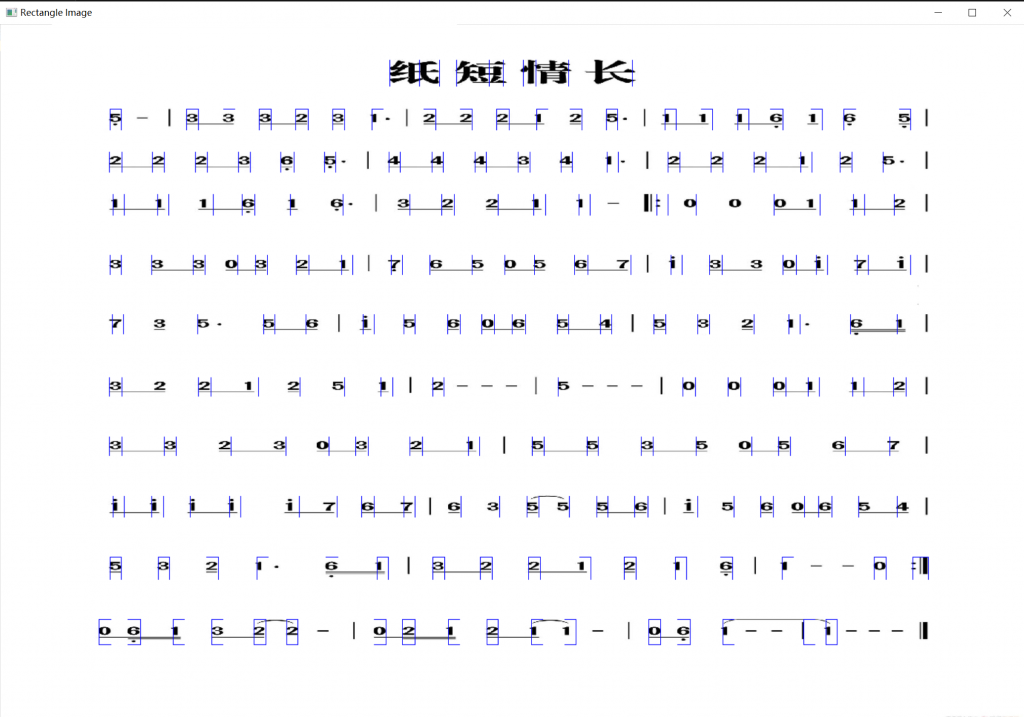
方案一:实现参数自动化,采用百分比的方式,并且给判断分支给予更大的判断空间,基本做到正确裁切,可以自适应大部分简谱,其中类A4效果最好。效果如下
#Numbered musical notation recognization
import cv2
from skimage.metrics import structural_similarity as ssim
from sklearn.decomposition import PCA
import matplotlib.pyplot as plt
import os
import numpy as np
import imutils

def read_img(img_path):
    """
    This function read img file then strengthen the picture
    args:
     img_path: you should provide file path here
     The return value threshold_img,img_shape,origin img
    """
    img = cv2.imread(img_path)
    gray_img = cv2.cvtColor(img, cv2.COLOR_BGR2GRAY)
    _, threshold_img = cv2.threshold(gray_img, 120, 1, cv2.THRESH_BINARY_INV)
    img_shape=threshold_img.shape
    return threshold_img,img_shape,img

def project_to_y(threshold_img,img_shape,rate_bar,rate_hight):
    """
    This function project picture to y axis
     args:
     threshold_img
     img_shape
     return edge_inf_y,row
    """
    row=0
    img_hight=img_shape[0]
    img_width=img_shape[1]
    bar_width=int(rate_bar*img_width)
    char_hight=int(rate_hight*img_hight)
    threshold_img_arr = np.uint8(np.array(threshold_img))
    #project the image to y-axis
    y_projection=np.sum(threshold_img_arr,axis=1)
    """print("inf of y")
    for i in range(len(y_projection)):
        print(y_projection[i])"""
    #find the horizontal line(area)
    in_num_flag=0
    edge_temp=0
    edge_inf_y=[]
    for i in range(img_hight):
        if in_num_flag==0 and y_projection[i]>bar_width:
            in_num_flag=1
            edge_temp=i
        elif in_num_flag==1 and y_projection[i]<bar_width and (i - edge_temp) >char_hight:
            in_num_flag=0
            #if (i - edge_temp) >50,10:
            edge_inf_y.append([edge_temp,i+int(char_hight*0.2)])
            row=row+1
            if (i*2 - edge_temp)<img_hight:
                i=i*2 - edge_temp
    return edge_inf_y,row

def project_to_x(threshold_img,img_shape,edge_inf_y,row):
    """
    This function project picture to x axis
     args:
      threshold_img
      img_shape
      return the full inf about edges
    """
    img_hight=img_shape[0]
    img_width=img_shape[1]
    x_projection=[]
    #first we need to enhance image again
    kernel = cv2.getStructuringElement(cv2.MORPH_RECT, (3, 3))
    dilate_img = cv2.dilate(threshold_img, kernel)
    #find the number row by row
    edge_inf=[]
    for i in range(row):
        cropImg= dilate_img[edge_inf_y[i][0]:edge_inf_y[i][1], 0:img_width]
        crophight,cropwidth=cropImg.shape
        cropImg_arr=np.uint8(np.array(cropImg))
        #project the image to x-axis
        x_projection=np.sum(cropImg_arr,axis=0)
        #find the vertical line(area)
        in_num_flag=0
        edge_temp=0
        for j in range(img_width):
            if in_num_flag==0 and x_projection[j]>(int(crophight*0.20)) and x_projection[j]<(int(crophight*0.68)):
                in_num_flag=1
                edge_temp=j
            elif in_num_flag==1 and x_projection[j]<(int(crophight*0.25)) and (j - edge_temp) >(int(cropwidth*0.01)):
                in_num_flag=0
                edge_inf.append([edge_inf_y[i][0],edge_inf_y[i][1],edge_temp,j+1])
    return edge_inf

def expo_obj(edge_inf,img,save_path):
    """
    export what we recongnized
    """
    for i in range(len(edge_inf)):
        cropImg= img[edge_inf[i][0]:edge_inf[i][1], edge_inf[i][2]:edge_inf[i][3]]
        cv2.imwrite(str(save_path)+str(i)+".jpg", cropImg)

def ncc(test_char_cmprs,train_char_cmprs):
    """# NCC classifier
    # arg: test_char_cmprs,train_char_cmprs
    # Return value: the name label of the closest number(list)"""
    row_test,_= np.shape(test_char_cmprs)
    row_train,_= np.shape(train_char_cmprs)
    test = float("inf")
    result=[]
    flag=0
    for j in range(row_test):
        test = float("inf")
        for i in range(row_train):
            dist_test = np.sqrt(np.sum(np.square(test_char_cmprs[j,:] - train_char_cmprs[i,:])))
            if dist_test < test:
                test = dist_test
                flag=i
        result.append(flag)
    return result

def gen_pca_field(edge_inf,img,numbers,train_path,x,y,r):
    """
    generate two 2-d arrays(reduced dimension,to r)
    "numbers" is the number of training pictures
    x and y present the size of pictures, only if all pictures are same size we can train the data
    """
    #crop pictures and arrange them into 2-d arrary
    gray_img_whole = cv2.cvtColor(img, cv2.COLOR_BGR2GRAY)
    _, threshold_img = cv2.threshold(gray_img_whole, 100, 255, cv2.THRESH_BINARY_INV)
    test_char=np.zeros((len(edge_inf), x*y))
    for i in range(len(edge_inf)):
        temp_img=threshold_img[edge_inf[i][0]:edge_inf[i][1], edge_inf[i][2]:edge_inf[i][3]]
        char_rcgnz=cv2.resize(temp_img,(x, y))
        img_Vector = np.reshape(char_rcgnz,(1,x*y))
        test_char[i,:]=(img_Vector)
    #then read the train pictures and arrange them into 2-d arrary
    train_char=np.zeros((numbers, x*y))
    for i in range(numbers):
        train_read = cv2.imread(str(train_path)+str(i)+".jpg")
        gray_img = cv2.cvtColor(train_read, cv2.COLOR_BGR2GRAY)
        _, threshold_img = cv2.threshold(gray_img, 120, 255, cv2.THRESH_BINARY_INV)
        char_rcgnz=cv2.resize(threshold_img,(x, y))
        img_Vector = np.reshape(char_rcgnz,(1,x*y))
        train_char[i,:]=(img_Vector)
    #do pca
    pca = PCA(n_components=r)
    pca.fit(train_char)
    test_char_cmprs = pca.transform(test_char)
    train_char_cmprs = pca.transform(train_char)
    return test_char_cmprs,train_char_cmprs


if __name__ == '__main__':
    img_path="D:\\NMN\\NMN7.jpg"
    #img_path="/home/range/Code/pythonProject4/jianpu3.jpg"
    #img_path="D:\\pythonProject4\\xunlian\\xunlian4.jpg"
    save_path="D:\\NMN\\save\\"
    #read picture
    threshold_img,img_shape,img=read_img(img_path)
    print("This is img size")
    print(img_shape)
    #project to y&x axis
    edge_inf_y,row=project_to_y(threshold_img,img_shape,0.001,0.018)
    edge_inf=project_to_x(threshold_img,img_shape,edge_inf_y,row)
    #import recognized characters into files
    expo_obj(edge_inf,img,save_path)
    #Do pca
    test_char_cmprs,train_char_cmprs=gen_pca_field(edge_inf,img,len(edge_inf),save_path,61,165,10)
    #result
    result=ncc(test_char_cmprs,train_char_cmprs)
    for i in range(len(result)):
        temp = cv2.imread(str(save_path)+str(result[i])+".jpg")
        #cv2.imshow(str(i),temp)
    #show
    rectangle_img=img
    for i in range(len(edge_inf)):
        rectangle_img = cv2.rectangle(rectangle_img, (edge_inf[i][2], edge_inf[i][0]), (edge_inf[i][3], edge_inf[i][1]),(255, 0, 0), thickness=1)
    cv2.namedWindow('Rectangle Image', 0)
    cv2.resizeWindow('Rectangle Image', 600, 500)
    cv2.imshow("Rectangle Image", rectangle_img)
    cv2.waitKey(0)
可以得出结论,这种投影的方式已经到达顶峰,虽然乍一看还不错,能完成切割的任务,但是给后期的识别带来了很大困难。比如因为连音的问题,相同的数字可能有着不同的裁切范围,会干扰判断,其次将字符完整处理,给数据库添加标签也很有难度,毕竟相同的数字和符号的组合也有很多种,绝对不是最优解。另外参数难以把握,无法给不同制谱软件给出普适性的识别方案(有的音节符号长于低音,有的短),此方案结束,开始尝试下一方案。
2.方案2,从数字入手,先识别数字
Views: 185