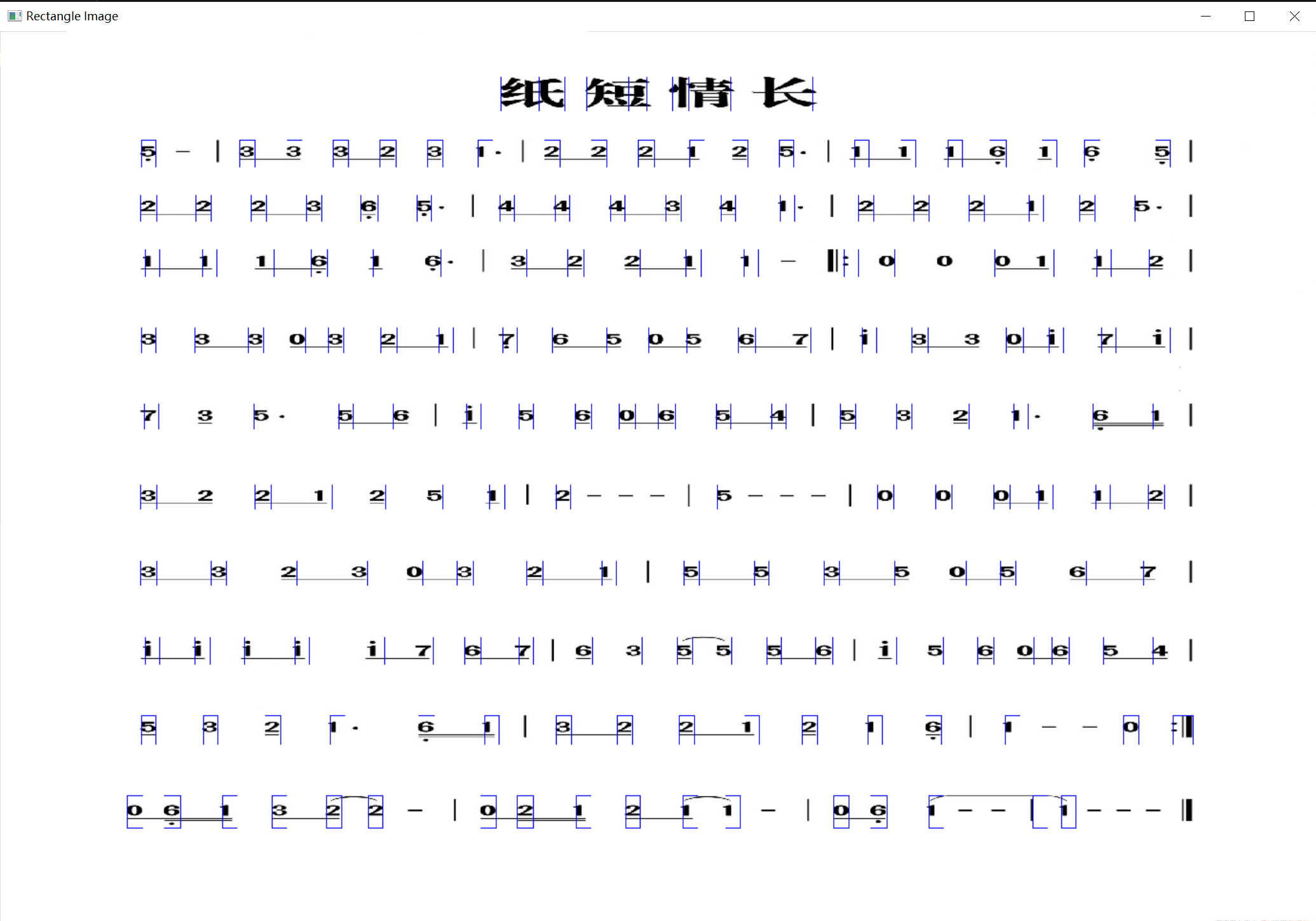
识别然后储存成文件,再用c语言调用Windows的MIDI的api,c语言没有map真的难受。别的不多说,上代码和视频。
#Numbered musical notation recognization
import cv2
from skimage.metrics import structural_similarity as ssim
from sklearn.decomposition import PCA
import matplotlib.pyplot as plt
import os
import numpy as np
import imutils
#training_path = "D:\\NMN\\train\\"

def reading_img_train(training_path,n,x,y):
    """ # arg: k people in total, and each person has n photos
    # The path of the parameter orl
    # This function returns a list of all photos
    # Read the folders in the order of first the name and then the serial number"""
    imagesArray_gray = np.zeros((n*12, x*y))
    i=-3
    print("start reading")
    while i <= 8:
        print(i,"th")
        for j in range(n):
            full_path = training_path + str(i) + '//' + str(j+1) + '.jpg'
            img = cv2.imread(full_path)
            img_gray = cv2.cvtColor(img, cv2.COLOR_RGB2GRAY)
            _, threshold_img = cv2.threshold(img_gray, 120, 255, cv2.THRESH_BINARY_INV)
            char_resized = cv2.resize(threshold_img, (x, y))
            img_Vector = np.reshape(char_resized,(1,x*y))
            imagesArray_gray[((i+3)*n)+j,:]=(img_Vector)
        i=i+1
    print("already read training photos")
    return imagesArray_gray

def reading_img(img_path):
    """
    This function reads img file then strengthen the picture
    args:
     img_path: you should provide file path here
     The return value threshold_img,img_shape,origin img
    """
    img = cv2.imread(img_path)
    gray_img = cv2.cvtColor(img, cv2.COLOR_BGR2GRAY)
    _, threshold_img = cv2.threshold(gray_img, 120, 1, cv2.THRESH_BINARY_INV)
    img_shape=threshold_img.shape
    return threshold_img,img_shape,img

def project_to_y(threshold_img,img_shape,rate_bar,rate_hight):
    """
    This function project picture to y axis
     args:
     threshold_img
     img_shape
     return edge_inf_y,row
    """
    row=0
    img_hight=img_shape[0]
    img_width=img_shape[1]
    bar_width=int(rate_bar*img_width)
    char_hight=int(rate_hight*img_hight)
    threshold_img_arr = np.uint8(np.array(threshold_img))
    #project the image to y-axis
    y_projection=np.sum(threshold_img_arr,axis=1)
    """print("inf of y")
    for i in range(len(y_projection)):
        print(y_projection[i])"""
    #find the horizontal line(area)
    in_num_flag=0
    edge_temp=0
    edge_inf_y=[]
    for i in range(img_hight):
        if in_num_flag==0 and y_projection[i]>bar_width:
            in_num_flag=1
            edge_temp=i
        elif in_num_flag==1 and y_projection[i]<bar_width and (i - edge_temp) >char_hight:
            in_num_flag=0
            #if (i - edge_temp) >50,10:
            edge_inf_y.append([edge_temp,i+int(char_hight*0.2)])
            row=row+1
            if (i*2 - edge_temp)<img_hight:
                i=i*2 - edge_temp
    print("projected y")
    return edge_inf_y,row

def project_to_x(threshold_img,img_shape,edge_inf_y,row):
    """
    This function project picture to x axis
     args:
      threshold_img
      img_shape
      return the full inf about edges
    """
    img_hight=img_shape[0]
    img_width=img_shape[1]
    x_projection=[]
    col_info=[]
    #first we need to enhance image again
    kernel = cv2.getStructuringElement(cv2.MORPH_RECT, (3, 3))
    dilate_img = cv2.dilate(threshold_img, kernel)
    #find the number row by row
    edge_inf=[]
    for i in range(row):
        cropImg= dilate_img[edge_inf_y[i][0]:edge_inf_y[i][1], 0:img_width]
        crophight,cropwidth=cropImg.shape
        cropImg_arr=np.uint8(np.array(cropImg))
        #project the image to x-axis
        x_projection=np.sum(cropImg_arr,axis=0)
        #find the vertical line(area)
        in_num_flag=0
        edge_temp=0
        each_col=0
        for j in range(img_width):
            if in_num_flag==0 and x_projection[j]>(int(crophight*0.20)) and x_projection[j]<(int(crophight*0.68)):
                in_num_flag=1
                edge_temp=j
            elif in_num_flag==1 and x_projection[j]<(int(crophight*0.25)) and (j - edge_temp) >(int(cropwidth*0.01)):
                in_num_flag=0
                edge_inf.append([edge_inf_y[i][0],edge_inf_y[i][1],edge_temp,j+1])
                each_col=each_col+1
        col_info.append(each_col)
    print("projected x")
    return edge_inf,col_info

def ncc(test_char_cmprs,train_char_cmprs):
    """# NCC classifier
    # arg: test_char_cmprs,train_char_cmprs
    # Return value: the name label of the closest number(list)"""
    print("doing ncc")
    row_test,_= np.shape(test_char_cmprs)
    row_train,_= np.shape(train_char_cmprs)
    test = float("inf")
    result=[]
    flag=0
    for j in range(row_test):
        test = float("inf")
        for i in range(row_train):
            dist_test = np.sqrt(np.sum(np.square(test_char_cmprs[j,:] - train_char_cmprs[i,:])))
            if dist_test < test:
                test = dist_test
                flag=i
        result.append((flag//60)-3)
    print("ncc done")
    return result

def gen_pca_field(edge_inf,img,numbers,train_path,x,y,r):
    """
    generate two 2-d arrays(reduced dimension,to r)
    "numbers" is the number of training pictures
    x and y present the size of pictures,
    only if all pictures are same size we can train the data
    """
    #crop pictures and arrange them into 2-d arrary
    print("doing pca")
    gray_img_whole = cv2.cvtColor(img, cv2.COLOR_BGR2GRAY)
    _, threshold_img = cv2.threshold(gray_img_whole, 100, 255, cv2.THRESH_BINARY_INV)
    test_char=np.zeros((len(edge_inf), x*y))
    for i in range(len(edge_inf)):
        temp_img=threshold_img[edge_inf[i][0]:edge_inf[i][1], edge_inf[i][2]:edge_inf[i][3]]
        char_rcgnz=cv2.resize(temp_img,(x, y))
        img_Vector = np.reshape(char_rcgnz,(1,x*y))
        test_char[i,:]=(img_Vector)
    print("croping done")
    #then read the train pictures and arrange them into 2-d arrary
    train_char=np.zeros((numbers*12, x*y))
    train_char=reading_img_train(train_path,numbers,x,y)
    print("reading train done")
    """for i in range(numbers):
        train_read = cv2.imread(str(train_path)+str(i)+".jpg")
        gray_img = cv2.cvtColor(train_read, cv2.COLOR_BGR2GRAY)
        _, threshold_img = cv2.threshold(gray_img, 120, 255, cv2.THRESH_BINARY_INV)
        char_rcgnz=cv2.resize(threshold_img,(x, y))
        img_Vector = np.reshape(char_rcgnz,(1,x*y))
        train_char[i,:]=(img_Vector)"""
    #do pca
    pca = PCA(n_components=r)
    print("generated pca")
    pca.fit(train_char)
    print("training pca")
    test_char_cmprs = pca.transform(test_char)
    print("transforming")
    train_char_cmprs = pca.transform(train_char)
    print("pca done")
    return test_char_cmprs,train_char_cmprs


if __name__ == '__main__':
    img_path="D:\\NMN\\NMN7.jpg"
    #img_path="/home/range/Code/pythonProject4/jianpu3.jpg"
    #img_path="D:\\pythonProject4\\xunlian\\xunlian4.jpg"
    #save_path="D:\\NMN\\save\\"
    train_path="D:\\NMN\\train\\"

    #read picture
    threshold_img,img_shape,img=reading_img(img_path)
    print("This is img size")
    print(img_shape)

    #project to y&x axis
    edge_inf_y,row=project_to_y(threshold_img,img_shape,0.001,0.018)
    edge_inf,col_info=project_to_x(threshold_img,img_shape,edge_inf_y,row)

    #import recognized characters into files
    #expo_obj(edge_inf,img,save_path)

    #Do pca
    test_char_cmprs,train_char_cmprs=gen_pca_field(edge_inf,img,60,train_path,61,165,10)

    #result
    result = ncc(test_char_cmprs,train_char_cmprs)
    mylog = open('D:\\NMN\\mylog.txt', mode = 'a',encoding='utf-8')
    count=0
    for i in range(row):
        #temp = cv2.imread(str(save_path)+str(result[i])+".jpg")
        #cv2.imshow(str(i),temp)
        for j in range(col_info[i]):
            print(result[count],end=' ',file=mylog)
            count=count+1
        print("\n", file=mylog)
    mylog.close()

    #show
    rectangle_img=img
    for i in range(len(edge_inf)):
        rectangle_img = cv2.rectangle(rectangle_img, (edge_inf[i][2], edge_inf[i][0]), (edge_inf[i][3], edge_inf[i][1]),(255, 0, 0), thickness=1)
    cv2.namedWindow('Rectangle Image', 0)
    #cv2.resizeWindow('Rectangle Image', 600, 500)
    cv2.imshow("Rectangle Image", rectangle_img)
    os.system("start D:\\vss1\\ConsoleApplication1\\x64\\Debug\\ConsoleApplication1.exe")
    cv2.waitKey(0)
#include <stdio.h>
#include <stdlib.h>
#include <Windows.h>

#pragma comment(lib,"winmm.lib")
#pragma warning(disable:4996)

enum Scale//这是群里的大仙帮我找到的音阶参数
{
    Rest = 0, C8 = 108, B7 = 107, A7s = 106, A7 = 105, G7s = 104, G7 = 103, F7s = 102, F7 = 101, E7 = 100,
    D7s = 99, D7 = 98, C7s = 97, C7 = 96, B6 = 95, A6s = 94, A6 = 93, G6s = 92, G6 = 91, F6s = 90, F6 = 89,
    E6 = 88, D6s = 87, D6 = 86, C6s = 85, C6 = 84, B5 = 83, A5s = 82, A5 = 81, G5s = 80, G5 = 79, F5s = 78,
    F5 = 77, E5 = 76, D5s = 75, D5 = 74, C5s = 73, C5 = 72, B4 = 71, A4s = 70, A4 = 69, G4s = 68, G4 = 67,
    F4s = 66, F4 = 65, E4 = 64, D4s = 63, D4 = 62, C4s = 61, C4 = 60, B3 = 59, A3s = 58, A3 = 57, G3s = 56,
    G3 = 55, F3s = 54, F3 = 53, E3 = 52, D3s = 51, D3 = 50, C3s = 49, C3 = 48, B2 = 47, A2s = 46, A2 = 45,
    G2s = 44, G2 = 43, F2s = 42, F2 = 41, E2 = 40, D2s = 39, D2 = 38, C2s = 37, C2 = 36, B1 = 35, A1s = 34,
    A1 = 33, G1s = 32, G1 = 31, F1s = 30, F1 = 29, E1 = 28, D1s = 27, D1 = 26, C1s = 25, C1 = 24, B0 = 23,
    A0s = 22, A0 = 21
};
enum Voice
{
    L1 = C3, L2 = D3, L3 = E3, L4 = F3, L5 = G3, L6 = A3, L7 = B3,
    M1 = C4, M2 = D4, M3 = E4, M4 = F4, M5 = G4, M6 = A4, M7 = B4,
    H1 = C5, H2 = D5, H3 = E5, H4 = F5, H5 = G5, H6 = A5, H7 = B5,
    LOW_SPEED = 500, MIDDLE_SPEED = 400, HIGH_SPEED = 300,
    _ = 0XFF
};


void play()
{
    FILE* fp = NULL;
    int read_char=0;
    fp = fopen("D:\\NMN\\mylog.txt", "r");
    HMIDIOUT handle;
    midiOutOpen(&handle, 0, 0, 0, CALLBACK_NULL);
    int volume = 0x7f;
    int voice = 0x0;
    int sleep = 500;
    int tmp;
    while (!feof(fp))
    {
        fscanf(fp, "%d", &read_char);
        printf("%d\n", read_char);
        switch (read_char)
        {
            case (-7):
                tmp = C3;
                break;
            case (-6):
                tmp = D3;
                break;
            case (-5):
                tmp = E3;
                break;
            case (-4):
                tmp = F3;
                break;
            case (-3):
                tmp = G3;
                break;
            case (-2):
                tmp = A3;
                break;
            case (-1):
                tmp = B3;
                break;
            case (0):
                tmp = 0XFF;
                break;
            case (1):
                tmp = C4;
                break;
            case (2):
                tmp = D4;
                break;
            case (3):
                tmp = E4;
                break;
            case (4):
                tmp = F4;
                break;
            case (5):
                tmp = G4;
                break;
            case (6):
                tmp = A4;
                break;
            case (7):
                tmp = B4;
                break;
            case (8):
                tmp = C5;
                break;
            case (9):
                tmp = D5;
                break;
            case (10):
                tmp = E5;
                break;
            case (11):
                tmp = F5;
                break;
            case (12):
                tmp = A5;
                break;
            case (13):
                tmp = B5;
                break;
            default:
                tmp = 0XFF;
                break;

        }
        voice = (volume << 16) + (tmp << 8) + 0x94;
        midiOutShortMsg(handle, voice);
        if (tmp != 0XFF)
            Sleep(sleep);
        else
            Sleep(50);
    }
    midiOutClose(handle);
    fclose(fp);
}


int main()

{


    play();

    return 0;

}
视频如下
方法还是比较笨,然后c语言写的不简练,识别还需要加强,不过好在是出效果了,继续优化。
Views: 128